Winter Snowflake Frames: A Versatile Design Element for Holiday Creations
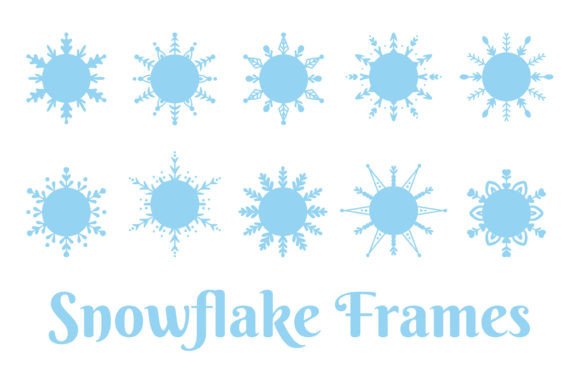
When it comes to holiday design, the right visual elements can make all the difference. Winter Snowflake Frames offer a unique and elegant way to add seasonal charm to your projects. These decorative empty circle frames feature intricate snowflake patterns that work beautifully as borders or focal points in various creative formats. Whether you're designing greeting cards, posters, invitations, or digital content for Christmas and New Year celebrations, these frames provide a cohesive and professional look with minimal effort.
What Are Winter Snowflake Frames?
Winter Snowflake Frames are vector-based illustrations featuring circular outlines adorned with detailed snowflake motifs. They come in high-resolution formats such as PNG, JPG, and EPS, making them suitable for both print and digital use. The set includes 10 PNG elements, 10 square JPG cards with white backgrounds, and one EPS file containing all elements. With dimensions of 5000 x 5000 pixels and 300 dpi resolution, these files ensure crisp, clear results across a wide range of applications.
Where Do Winter Snowflake Frames Fit Into Your Workflow?
These frames are ideal for enhancing the final presentation of your designs. They can be used at different stages depending on your project:
- Pre-Design Phase: Use the frames as inspiration for layout structure or color schemes that match the winter theme.
- Drafting Phase: Incorporate the frames into mockups to visualize how they’ll appear when applied to cards, posters, or product designs.
- Finalization Phase: Apply the frames to polished designs to create a finished, festive appearance before exporting or printing.
Their versatility allows them to serve as either background accents or foreground highlights, depending on your aesthetic goals. Since they are transparent or have a clean white background, they blend seamlessly with most color palettes and styles.
Greeting Cards and Invitations
One of the most common uses for Winter Snowflake Frames is in holiday greeting cards and invitations. Their round shape makes them perfect for framing text or photographs while maintaining a balanced composition. You can easily place the frame around the main message or event details, creating a sense of unity and elegance.
For printed materials like postcards or paper invites, the high-resolution JPGs ensure that the design remains sharp and visually appealing. When using PNGs, take advantage of the transparency to layer the frame over images or textured backgrounds without losing clarity.
Website and Social Media Design
Online platforms benefit greatly from the inclusion of Winter Snowflake Frames. On websites, they can be used to highlight seasonal promotions, holiday banners, or user-generated content. For social media posts—especially those shared during December—they help maintain brand consistency while adding a touch of holiday cheer.
Since these frames are scalable and compatible with most design software, you can adjust their size to fit any screen format. This makes them especially useful for ensuring that your visual identity remains strong across desktop and mobile views.
Product and Merchandise Printing
If you're involved in sublimation printing, custom t-shirt creation, mug decoration, or tote bag designs, these frames can elevate your offerings. Their detailed yet delicate nature complements minimalist or maximalist styles alike, allowing you to cater to a broader audience.
When preparing for merchandise production, consider how the placement of the snowflake frame affects readability and aesthetics. For example, centering the frame on a T-shirt ensures symmetry, while positioning it off-center might add a more dynamic feel. Always check compatibility with your printing platform and fabric types to avoid distortion or misalignment.
Workflow Tips for Using Winter Snowflake Frames
Here’s how to smoothly integrate Winter Snowflake Frames into your design process:
- Choose the Right Format: Use PNG for layered designs, JPG for flat prints, and EPS for scalability and editing in vector programs like Adobe Illustrator.
- Layer Thoughtfully: Place the frame behind or above other design elements based on your desired effect. Transparent PNGs allow for subtle blending, while white-background JPGs work best for bold, clean looks.
- Maintain Consistency: If using multiple frames in a single project (e.g., a scrapbook), apply similar styling or spacing to keep the design harmonious.
- Test Print or Preview: Before finalizing any print-ready material, preview how the frame appears in context. This helps catch alignment issues or color clashes early in the workflow.
For digital workflows, organize your assets by separating the frame files from other design components. Naming conventions such as “Snowflake_Frame_01” or “Winter_Border_03” will help streamline future access and reuse.
Combining Winter Snowflake Frames with Other Design Elements
To enhance your designs further, pair Winter Snowflake Frames with complementary assets such as:
- Typography: Choose fonts that reflect the season—serif scripts for traditional holiday vibes, sans-serif for modern themes.
- Icons and Graphics: Add small icons like gift boxes, Christmas trees, or snowmen within the frame for added depth and storytelling.
- Textures and Backgrounds: Combine the frame with soft gradients, parchment textures, or gentle snow effects to evoke a wintry atmosphere.
Use design software like Canva, Photoshop, or Inkscape to experiment with overlays and opacity settings. These tools let you fine-tune how the snowflake border interacts with underlying layers, helping you achieve the exact visual balance you want.
Business and Marketing
Professionals in marketing and branding often seek ways to incorporate seasonal elements without compromising professionalism. Winter Snowflake Frames offer an elegant solution for holiday-themed business cards, email templates, or promotional flyers. Their classic design appeals to a broad demographic and works well in both B2B and B2C contexts.
Education and Event Planning
Educators and event planners can use these frames in classroom decorations, holiday newsletters, or party invitations. The clean lines and recognizable motifs make them suitable for both children's crafts and formal adult events. For DIY educators, they’re also a great resource for teaching students about graphic design principles like layering, contrast, and framing techniques.
Home Decor and Handmade Crafts
Handmade enthusiasts will find Winter Snowflake Frames invaluable for decoupage projects, scrapbooking layouts, or custom wall art. Because they come in high quality, you can print them directly onto cardstock or transfer them onto glass, wood, or fabric surfaces using appropriate adhesives or sublimation methods.
Consider using the EPS file to customize the snowflake pattern if you want to adapt it to specific themes or client preferences. This level of flexibility is rare in stock design assets and can save considerable time in revisions or personalization efforts.
Ensuring Quality and Long-Term Use
To get the most out of your Winter Snowflake Frames, follow these best practices:
- Organize Your Files: Keep the individual PNGs and JPGs sorted by use case to avoid confusion later. Labeling each image clearly will speed up your workflow when revisiting past projects.
- Backup and Version Control: Save edited versions separately so you can track changes or revert to earlier iterations if needed. This is especially important for commercial or collaborative projects.
- Check Compatibility: Ensure that the chosen file type matches your output requirements. For example, use PNGs for layered digital graphics and JPGs for standard print jobs.
- Respect Licensing: If these frames are being used for commercial purposes, confirm that your license allows for such usage. This protects you from potential legal issues down the line.
Also, always proofread your final designs after applying the frames. Small details like text alignment or image cropping can affect the overall impact of the piece. A quick review before publishing or printing ensures a polished outcome.
Getting Started with Winter Snowflake Frames
Integrating Winter Snowflake Frames into your next holiday project is straightforward. Here’s a simple approach to kick things off:
- Download the zip file and extract its contents.
- Open your preferred design tool and import the frame that best suits your layout.
- Resize and position the frame to complement your content.
- Adjust colors or add effects if necessary to match your brand or theme.
- Export the final design in the required format for your intended use.
This method keeps your process efficient and focused. Once you’ve mastered the basics, you can begin experimenting with advanced techniques such as animation, interactive elements, or multi-layer compositions for web or video projects.
Why Winter Snowflake Frames Stand Out
Compared to generic clipart or overly complex graphics, Winter Snowflake Frames strike a balance between simplicity and sophistication. Their structured format ensures that even novice designers can produce high-quality outputs quickly. Moreover, the inclusion of an EPS file gives professionals the ability to edit paths and shapes, which is crucial for customizations or scaling beyond standard sizes.
Another key advantage is their adaptability. Whether you're working with a team on a corporate campaign or crafting personalized gifts for friends and family, these frames can be tailored to meet diverse needs. They also support long-term use through consistent quality and compatibility with updated design technologies.
Conclusion
Incorporating Winter Snowflake Frames into your holiday design toolkit offers practical benefits across many creative domains. From digital greetings to printed merchandise, they provide a refined aesthetic that aligns with seasonal themes while supporting efficient workflows. By understanding their strengths and limitations, you can maximize their value and deliver compelling results year after year.